If your Chrome tabs all look the same, you are not alone.
When you are working inside the same tools all day, Docs, dashboards, tickets, reports, every tab starts blending together.
Tab Colorizer Pro was built to fix that using color.
And now, it is easier than ever to use.
How It Works
You can now color a Chrome tab directly from the right-click menu.
Just:
- Right-click the tab
- Select your color
- Look for the
<--arrow next to the active color
That is it.
No memorizing shortcuts.
No digging through settings.
No wondering if it worked.
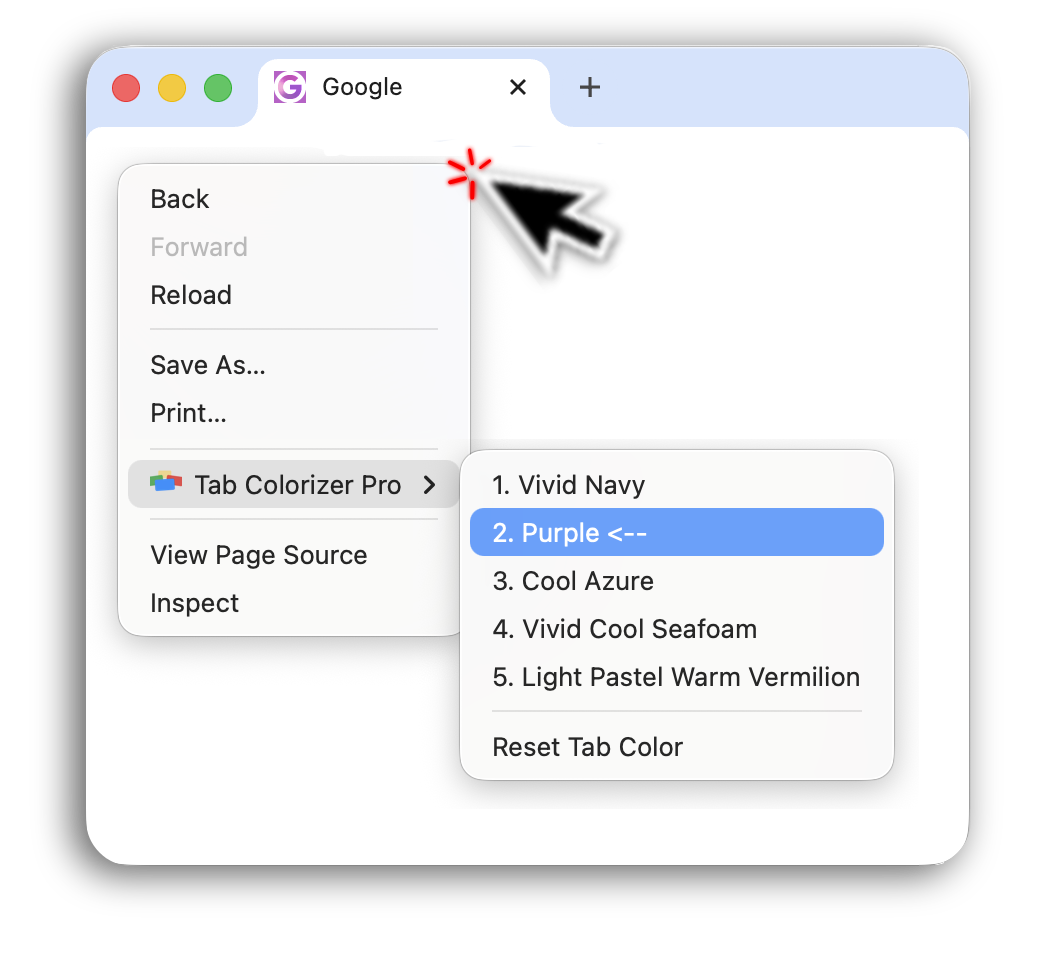
The right-click menu shows a <-- marker beside the color currently set on that tab,
so you get instant confirmation.
The change is immediate and visible.
Why This Matters
Most people do not think, "Let me configure a keyboard shortcut."
They think, "I just need this tab to stand out."
Right-clicking is already part of how Chrome works.
Now coloring tabs fits naturally into that behavior.
When tabs look the same, your brain has to:
- Re-read tiny tab titles
- Hover repeatedly
- Click the wrong tab and go back
- Repeat
Color removes that friction instantly.
No More Shortcut Confusion
Previously, coloring tabs relied heavily on a keyboard shortcut.
If that shortcut was not set up properly, it felt like the extension did not work.
Now:
- You do not need a shortcut to use it
- If you want one, it's still an option
- No more cycling through each color, pick the one you want directly
No dead buttons.
No guessing where to configure it.
You Still Have Options
Right-click is now the simplest way to color Chrome tabs.
But you can also:
- Change colors directly from the streamlined settings flow
- Set a custom keyboard shortcut if that fits your workflow
The goal is flexibility, without confusion.
If You Tried It Before
And felt unsure how to use it, this update was built for you.
The right-click feature removes the biggest friction point new users experienced.
If your Chrome tabs look the same, this is the fastest way to fix it.
Learn about the full release in Tab Colorizer 2.0: The Right-Click Update.
Then try the interactive demo, review pricing options, or check the FAQ.