Tab Colorizer Pro was built for one simple purpose, use color to differentiate between identical Chrome tabs.
If you've ever had 10+ tabs open from the same tool, Docs, dashboards, tickets, reports, you know how quickly they all start to look the same.
This update makes solving that problem dramatically easier.
Introducing Right-Click Tab Coloring
You can now color a Chrome tab directly from the right-click menu.
No shortcut setup required.
No guessing what to press.
No digging through settings.
Just:
Right-click → Choose a color → Done.
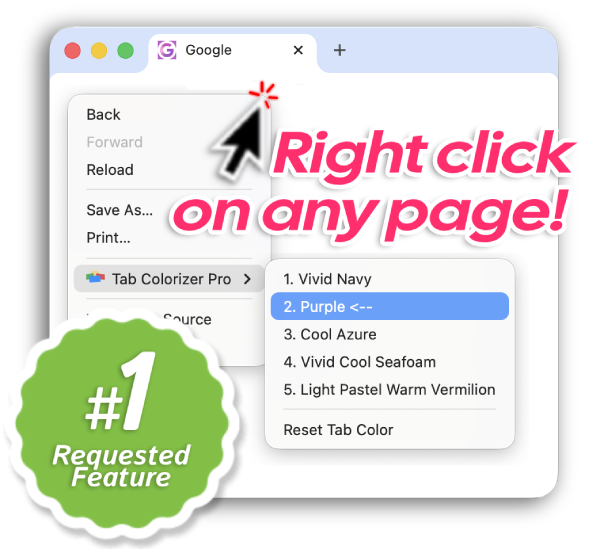
This small change removes the biggest friction point new users experienced.
A Completely Rebuilt Settings Experience
We removed the old full settings page and rebuilt the experience from the ground up.
What's different:
- A clear, numbered usage flow built into the UI
- Helpful mini popups explaining what each option does
- All color selections visible in one block
- Instant color change directly from the pop-up page
- Visualize and Colorize at the same time, no more guesswork
- Right click context menu for easy tab coloring
- Extended notes organized cleanly below the core controls
- Customizable and unique color names to choose from
Everything is condensed.
Everything is easier to understand.
Everything is intentional.

What Prompted This Update
We noticed something frustrating.
Some users would install the extension and uninstall it shortly after.
Not because it didn't work.
Because it wasn't immediately obvious how to use it.
The right-click feature, an intuitive user interface, and simplified flow remove that confusion.
The value is now visible immediately. You can also watch the demo video for a quick walkthrough.
Who This Is For
Tab Colorizer is for:
- Anyone juggling identical Chrome tabs
- People who work inside the same tools all day
- Visual thinkers who benefit from color coding
- Users who didn't even realize their tab bar could feel calmer
If your Chrome tabs look the same, this update was built for you.
Update or Install Today
If you already use Tab Colorizer Pro, update to 2.0 and try the right-click feature.
Want the full changelog for this version? Read the v2.0.0 release notes.
If you've never tried it, start on the homepage, review pricing options, or check the frequently asked questions.
Want a focused walkthrough of one-click tab coloring? Read Why All Your Browser Tabs Look the Same.